











Hi, I’m Leafy!

Plant care you never have to think about

Snap a photo: Leafy identifies your plant, puts together its care profile and reminds you to water, fertilize and mist – right when it’s due.

Download on the App StoreGet it on Google Play

Free to download. Up to two plants for free, unlimited with Leafy Pro.

Friends view with new stickers and messages and the list of your friends
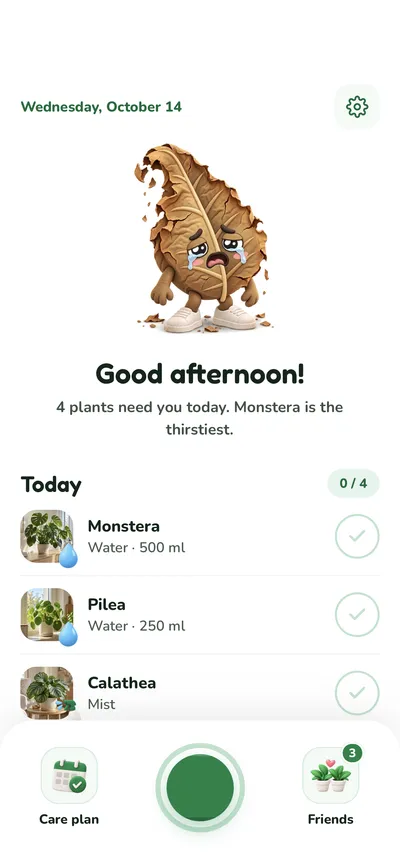
Leafy’s home screen: Leafy greets you, below are today’s tasks to tick off and the bar with care plan, shutter and friends
Plant detail of a monstera with a large photo, stickers from friends and Leafy’s care status

As easy as that

Three steps – then Leafy takes over.

  1. Snap a photo

    Point your camera at your plant or pick a photo from your gallery.

  2. Leafy identifies it

    In seconds you know which plant it is – care profile included.

  3. Your care plan is set

    Watering, fertilizing and misting are scheduled. Leafy reminds you in time.

  • 7

    details in the care profile

  • 3

    reminders: water, fertilize, mist

  • 9

    stickers for your friends

  • 10

    languages in the app

Everything your plants need

No green thumb required. Leafy handles the part everyday life makes you forget – and helps when a leaf starts drooping.

Identify & care profile

Snap a photo, know your plant

Leafy identifies houseplants, succulents, herbs and flowers from a photo and creates a care profile for each one. It stays saved with the plant – no new photo needed to look things up.

  • Take a photo or pick one from your gallery
  • Name, botanical name and a short description
  • Leafy’s tips for exactly this plant

In the care profile

  • Light
  • Water
  • Temperature
  • Humidity
  • Soil
  • Fertilizer
  • Pets
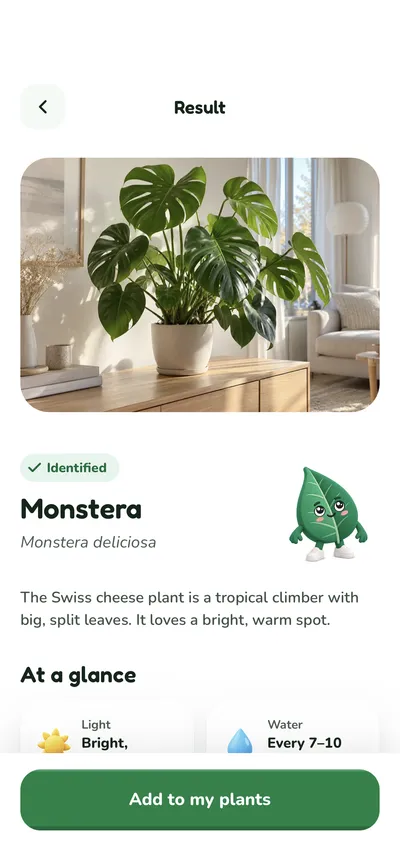
Result after the photo: a monstera identified, with a description and “At a glance”

Care plan & reminders

Never forget to water again

Every plant gets its own rhythm for watering, fertilizing and misting – watering comes with the right amount in millilitres. The care plan shows your whole week, and you simply tick off what’s done.

  • One reminder a day, at the time you choose
  • Watering, fertilizing, misting and cuttings in one list
  • Rest periods like the winter break are already planned in

Leafy shows you how your plants are doing

  • Happy
  • Thirsty
  • Wilting
  • Dried out
Home screen with a thirsty, wilting Leafy: four plants need care today
Care plan with the week strip and today’s tasks including the amount of water, two of them ticked off

Doctor Leafy

Pro

Something’s off? Ask Doctor Leafy

Yellow leaves, brown spots, drooping stems: take a close-up photo of the problem. Doctor Leafy names likely causes with how likely they are and tells you what to do now.

  • A rating from “Looks healthy” to “Needs attention”
  • Concrete steps – add a matching reminder right away
  • Every diagnosis is saved in the plant’s history

Leafy’s AI gives general guidance, not a guarantee.

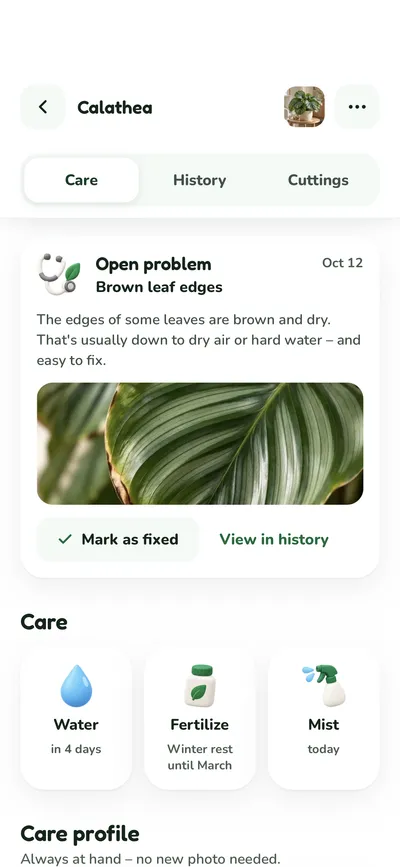
Plant detail with the open problem “Brown leaf edges”, a photo and “Mark as fixed”
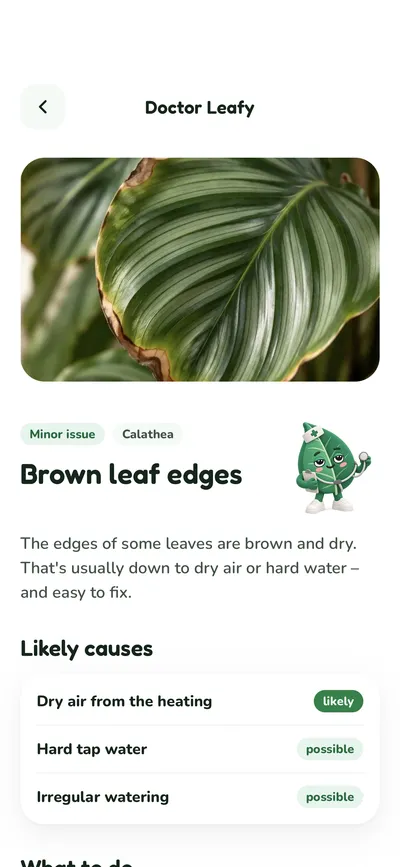
Doctor Leafy: the diagnosis “Brown leaf edges” with likely causes and how likely they are

Cuttings

One plant becomes two

Leafy shows you which of your plants are easy to propagate and guides you step by step – in a glass of water or in soil.

  • A guide made for your plant, with difficulty and duration
  • Reminders to change the water or keep the soil moist
  • Rooted? Pot it – and your cutting becomes a plant of its own
Cuttings overview: a pothos cutting is growing in water, below are plants that are easy to propagate
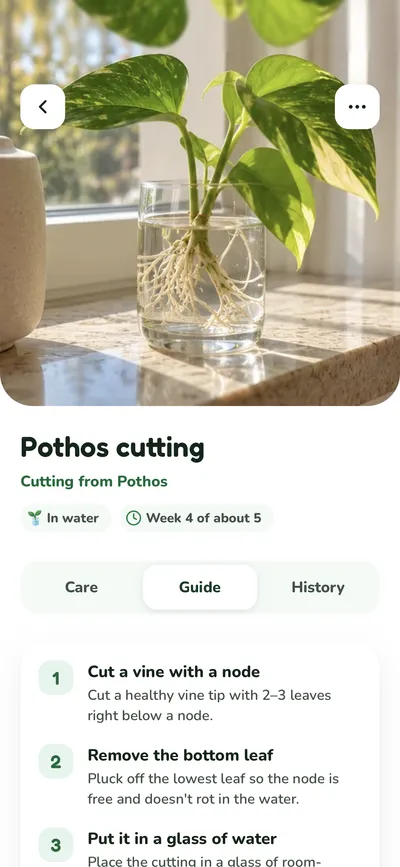
Cutting guide for a pothos: in water, week 4 of about 5, step by step

Friends & stickers

Plants are better together

Invite friends with a link and peek into each other’s jungle. Put stickers on each other’s plants – with a little note if you like.

  • See your friends’ plants and how they’re doing
  • Nine stickers, from heart to rainbow
  • You decide what friends see: plants, history, diagnoses
Sticker picker for a friend’s plant: heart, star, sun, drop, thumbs up, crown and more, with a message
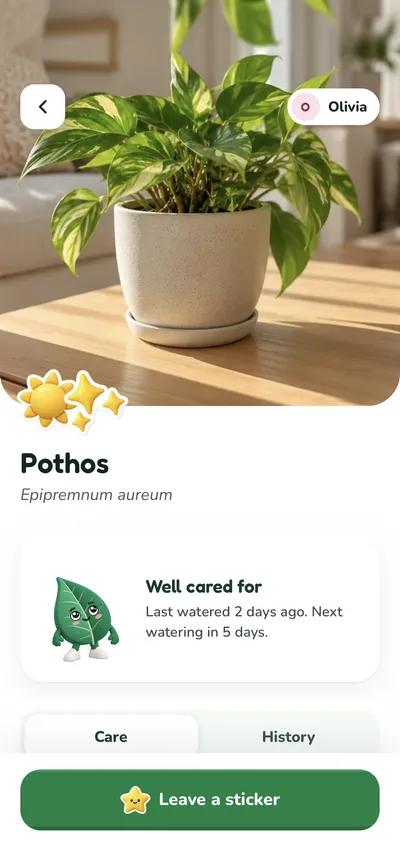
A friend’s plant with stickers, its care status and the “Leave a sticker” button

History & progress

Watch your jungle grow

Every watering, fertilizing and misting goes into the history, along with diagnoses and new cuttings. Capture how your plant grows with a photo or a note.

  • A timeline for every plant, sorted by month
  • Filters for watering, fertilizing, misting, diagnoses and progress
  • Pick a progress photo as your plant’s photo later on
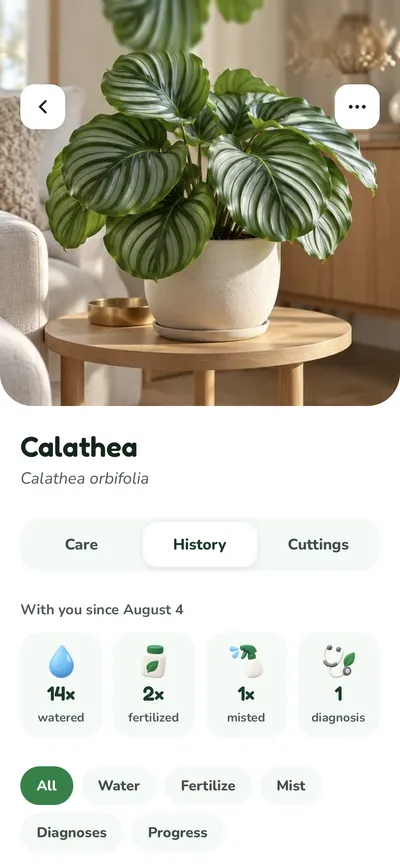
History of a calathea: how long it has been with you, counters for watering, fertilizing and misting, and filters

Leafy in motion

From the first photo to a happy jungle – in half a minute.

Start for free, grow with Pro

Leafy is free. For a bigger jungle and Doctor Leafy, there’s Leafy Pro.

Leafy Free

For your first plants

Free

  • Up to 2 plants
  • Photo identification & care profile
  • Reminders for watering, fertilizing & misting
  • Care plan & history
  • Cuttings with step-by-step guides
  • Friends & stickers
Pro

Leafy Pro

For your whole jungle

Monthly, yearly or one-time

  • Unlimited plants
  • Doctor Leafy – photo diagnosis and how to fix it
  • Everything in Leafy Free

You’ll see the price in the app before you buy. Purchases and cancellations go through the App Store or Google Play.

Frequently asked questions

Is Leafy free?

Yes. You can use Leafy for free indefinitely and add up to two plants – with identification, care profile, reminders, care plan, cutting guides and friends. Unlimited plants and Doctor Leafy are part of Leafy Pro.

How reliable is plant identification?

Identification runs on an AI model and works very well for common houseplants. A sharp, well-lit photo with a single plant in the centre of the frame gives the best results. If Leafy gets it wrong, tap “Not the right plant?” and try again with a new photo. You can adjust the name, watering schedule and reminders yourself at any time.

What happens to my photos?

Your photos are kept in a private storage area only your account can access. For identification and Doctor Leafy, the image in question is sent to Google's Gemini AI interface – without your name, email address or any other account data. You can delete plants along with their photos in the app at any time.

What do my friends see?

Only what you share. Under “Friends & privacy” you decide whether friends see your plants, your history and diagnoses, and whether they can leave stickers – and you pick the visible plants one by one. You only become friends through your invite link.

Do I need an account?

Yes, so that your plants and your care plan are backed up and reappear on a new device. Sign-in works via “Sign in with Apple” or “Sign in with Google” – you don't have to create another password.

Does Leafy work without notifications?

Yes. The home screen and the care plan always show what’s due today. Reminders arrive once a day at the time you choose – convenient, but optional. You can turn them off at any time in the app or in your system settings.

Which languages does Leafy speak?

Leafy speaks ten languages: English, German, Spanish, French, Italian, Dutch, Portuguese, Japanese, Korean and Chinese.

How do I cancel Leafy Pro?

Through the subscription management of your App Store or Google Play account – wherever you subscribed. After cancelling, Pro stays active until the end of the period you paid for. The one-time lifetime purchase doesn’t need to be cancelled.

How do I delete my account?

Directly in the app under Settings → Delete account. This permanently removes your account along with all plants, photos and care data. Alternatively, just write to us.

Ready for your jungle?

Download Leafy for free on the App Store or Google Play – Leafy can’t wait to meet your plants.

Download on the App StoreGet it on Google Play